EN
EN

Why Small Laser Engraving Machines Are the Ideal Entry Point for Beginners
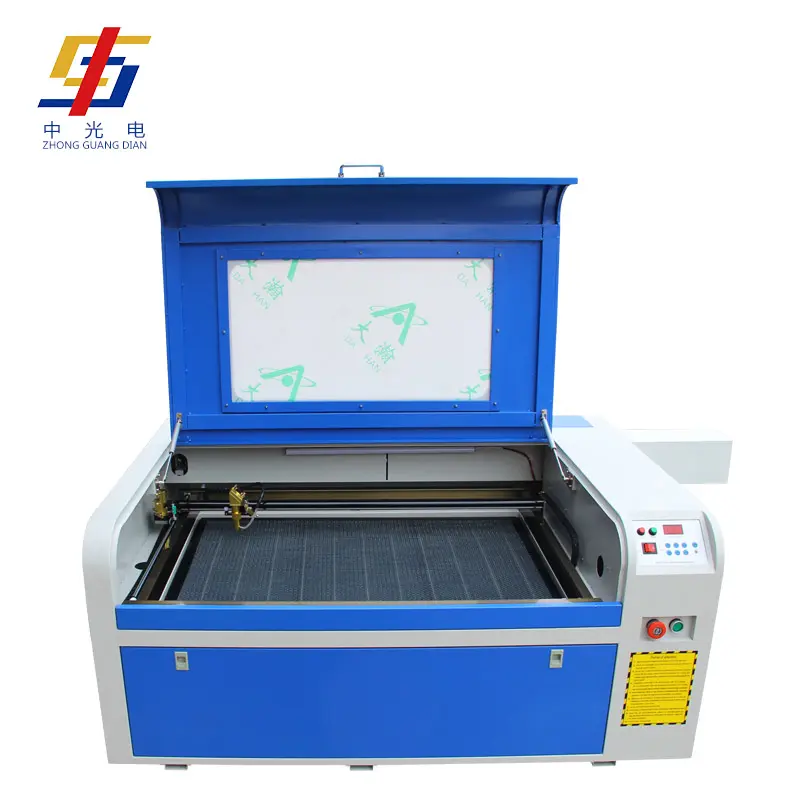
For folks just starting out, small laser engraving machines provide a pretty straightforward way to get into precision engraving work. These little devices don't take up much space at all and are super easy to set up right out of the box. No need for some fancy workshop or special electrical hookups either. A lot of these machines will fit comfortably on a desk or table surface, working well even in tight spaces like home offices or tiny apartment work areas. Think about it compared to those big industrial lasers from years back which needed massive rooms with proper ventilation systems running alongside them, often taking up over fifty square feet of floor space alone.
Lower barrier to entry: compact size, plug-and-play setup, and minimal space requirements
- Space efficiency: Fits on standard desks (typical dimensions: 20"x16")
- Simplified setup: USB connectivity and pre-calibrated components
- Immediate operation: Minimal assembly with guided tutorials
Built-in safety and simplified operation: enclosed design, automatic calibration, and beginner-focused software
Safety innovations make desktop models particularly beginner-friendly:
- Full enclosure prevents accidental laser exposure
- Automatic bed leveling replaces manual calibration
- Intuitive drag-and-drop interfaces like LightBurn reduce learning curves
- Preset material libraries prevent user error
Beginners avoid the steep costs and complex maintenance of industrial systems, with entry-level models costing 90% less than commercial alternatives. This combination of safety, compactness, and guided workflows creates an optimal starting point for new users.
Key Features That Define a Beginner-Friendly Small Laser Engraving Machine
User-Friendly Software and Intuitive Controls
Newcomers really benefit from easy to use interfaces. Think about drag and drop designs, ready made material options that take away all the second guessing, plus live previews so they can see what their engravings will look like before turning on the laser. People make fewer mistakes when they get to see results instantly, cutting down on wasted stuff. Around 60 percent fewer errors actually happen with these kinds of setups. That's why LightBurn compatible machines keep coming up in recommendations. They're so straightforward to learn, making them great for folks who want to make custom presents or run little businesses without needing any programming skills whatsoever.
Safe, Low-Power Diode Technology
Sub 10 watt diode lasers don't need all the fancy ventilation systems or complicated electrical work that those high voltage CO2 models demand. The way they're built keeps those stray laser beams contained pretty well. And when someone opens the cover, the machine just shuts itself off automatically. That's why these little diode engravers have become so popular in home workshops and school labs lately. A lot of teachers actually care about this stuff too - around 95 percent according to some surveys we've seen. Another big plus point is there are no nasty fumes coming off when working with materials like wood or acrylic. So folks running smaller operations save themselves a ton of money because they don't have to install expensive exhaust systems.
Key Metrics in Beginner Models
| Feature | Diode Advantage | CO₂ Limitation |
|---|---|---|
| Safety | Eye-safe wavelengths, no high voltage | Requires protective enclosures |
| Ventilation | Optional for most materials | Mandatory exhaust systems |
| Power Consumption | Standard household outlets | Often needs 220V circuits |
| Maintenance | No mirrors/lens alignment | Weekly calibration needed |
Small Laser Engraving Machine Comparison: Diode vs. CO₂ for First-Time Users
Diode Advantages: Affordability, Portability, and Ease of Maintenance for Beginners
For people just getting into laser engraving, diode lasers are really taking over at the lower price points because they offer so many benefits. The cost factor alone makes them attractive since most models come in below $1000, which isn't too bad considering what they can do. Plus, these units aren't heavy either, usually weighing somewhere around 15-20 pounds max, so folks with small workshop spaces can easily fit one on their bench or shelf. When it comes to maintenance, there's not much to worry about compared to other types of lasers. No need for complicated alignment procedures or running coolant through tubes everywhere. According to some recent industry data from last year, nearly nine out of ten newbies who bought their first machine went with a diode model specifically because they wanted something that didn't require constant tinkering. And let's face it, who has time for that? What makes diode lasers even better is how versatile they are with different materials. They work great on wood products, leather goods, and even certain metal surfaces that have been treated properly, all without needing someone with advanced technical skills standing by.
CO₂ Trade-offs: Higher Power and Material Versatility vs. Complexity, Ventilation Demands, and Steeper Learning Curve
CO2 lasers work great on materials like acrylic, glass, and raw wood, which is why many professionals prefer them. But there's a catch. These machines typically run at 40 watts or more, so they need serious ventilation setups that can add around $500 to the overall cost of getting started. Safety is also a bigger concern here. Most workshops need to be fully enclosed, and operators must go through proper training before using these beasts. Looking at industry numbers, CO2 laser setups take about 30% longer to get running compared to diode lasers. New users often spend anywhere from two to three weeks learning how everything works, getting familiar with the software, and figuring out those tricky calibration settings. And let's face it, despite all that power, most hobbyists find themselves overwhelmed. A recent survey found that nearly two thirds of people who bought their first laser cutter ended up wishing they had gone with a simpler diode system instead.
What Beginners Should Prioritize When Buying a Small Laser Engraving Machine
Optimal wattage range (5–10W) and feature balance: avoiding underpowered limitations and overpowered overwhelm
For those just starting out with laser engraving, going for a 5 to 10 watt diode system makes sense most of the time. These work pretty well on common stuff like wood, acrylic, and leather without getting too complicated. Anything below 5 watts really struggles when working with different materials though. On the flip side, anything above 15 watts needs proper cooling systems and extra safety precautions which can be a pain for home use. When shopping around, look for machines that come with preloaded material settings and autofocus features rather than focusing solely on maximum power output. This helps avoid the frustration of watching projects take forever to complete while still keeping things safe in a home workshop environment. Stay away from models loaded with tons of fancy industrial controls that nobody actually needs. Those just complicate things unnecessarily. Better to go with something simple but effective that lets creativity happen without getting bogged down by technical details all the time.
Total cost of ownership: software subscriptions, consumables, upgrade paths, and community support
Evaluate ongoing expenses beyond the purchase price. Free design software with lifetime updates prevents recurring subscription fees. Factor in consumables:
- Replacement lenses ($20–$50 annually)
- Air assist components ($40–$100)
- Material testing kits ($30–$75)
Modular machine designs make it possible to upgrade components over time, such as adding those handy rotary attachments when needed. Look for manufacturers who maintain active online communities and comprehensive tutorial resources these can be lifesavers when problems arise. The community aspect really works wonders, with most new users finding solutions on their own through shared experiences about 9 out of 10 times without needing to contact customer service. Stay away from systems that tie buyers into costly proprietary accessories down the road. Before making a purchase decision, it pays to do the math on total expenses over three years this helps prevent unpleasant financial shocks later on when unexpected replacement parts become necessary.
FAQs
Are small laser engraving machines safe for beginners?
Yes, small laser engraving machines are safe for beginners due to their enclosed design, automatic shutdown features, and intuitive software that reduces user error.
What should I consider regarding the cost before purchasing a small laser engraver?
Consider ongoing costs such as software subscriptions, consumables, and potential upgrades. Free software with updates and modular designs can help manage these costs efficiently.
Is a diode laser better than a CO2 laser for beginners?
Diode lasers are generally better for beginners due to their affordability, ease of use, and simple maintenance compared to CO2 lasers, which require more complex setups and ventilation.
Table of Contents
- Why Small Laser Engraving Machines Are the Ideal Entry Point for Beginners
- Key Features That Define a Beginner-Friendly Small Laser Engraving Machine
- Small Laser Engraving Machine Comparison: Diode vs. CO₂ for First-Time Users
- What Beginners Should Prioritize When Buying a Small Laser Engraving Machine
- FAQs